Preferences can also be created within the coverage zone of the spot. These preferences are used to select a cell located at some specific point of that zone. For the spot  , a function
  may be chosen, such a way, that cells located at some direction will be privileged. This direction is denoted by the vector
  , which is the spin of the spot.
Function may be calculated as  where
where  is the Euclidean distance from spot’s origin to cell
  ,
,  and
and  , express the alignment of the cell to the spin , being
  a vector perpendicular to .
Values 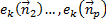 , for cells within the coverage zone of may be obtained locally, assigning initial values to cells members of initial coverage zone, then applying a local function to calculate values for new cells, as the coverage zone expands.
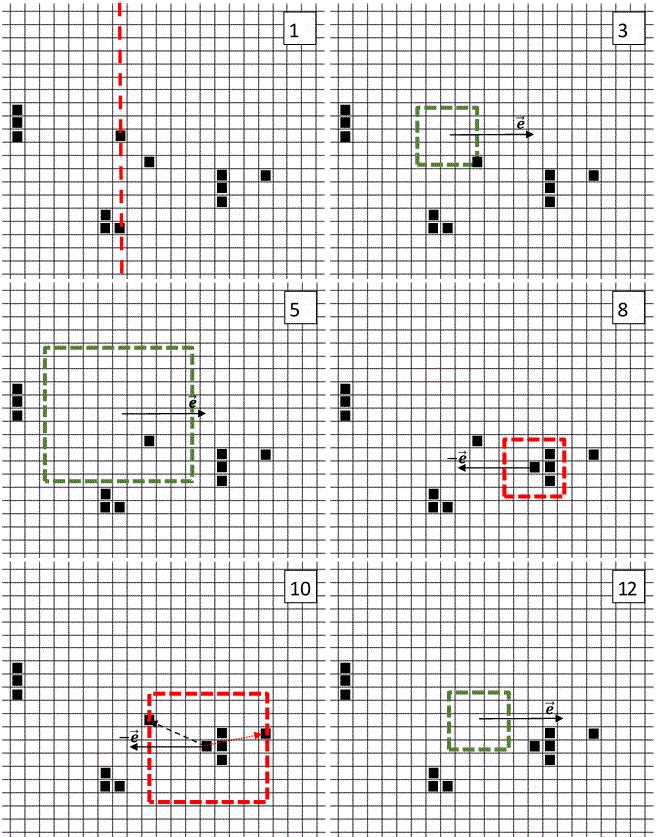
The animation demonstrates how applies the Energy Incidence Criterion in order to select the correct cell. The positive spot´s spin points at specific location in cell space. At step 6, this configuration causes the selection of the cell which is the most aligned with the vector, among the three covered cells. That cell is born, generating a negative spot with inverse spin. Again, this spot selects the cell forming the lowest angle with its own spin.
 Energy Driven Cellular Automata